One engine. Every agent.
NL2SQL, Document AI and Agent Studio are the shared core. Enterprise Intelligence (invoice, contract, spend, compliance) and Healthcare Intelligence (risk adjustment, RADV, clinical evidence) are built on top — cross-checking documents against your data and automating work end-to-end, all in your own cloud.
One pipeline. Four agent outputs. Zero data movement.
Your Data Sources
Healthcare
Read-only · Zero egress
InferonIQ AI Engine
What You Get
Five steps, from raw data to recovered cash.
The walkthrough plays automatically — or jump to any step to see how the agents process your data end to end.
Connect any source
Pull invoices, contracts, databases and clinical records from any system. Read-only connections — your data never moves.
One platform. Six working surfaces.
Every module runs on the same catalog, the same governance and the same agents — so what you connect once is understood everywhere.
Turn clinical evidence into defensible action.
Connect claims, charts and your CMS files. See which risk dollars would survive a RADV audit, with every score checked against what CMS paid, every HCC against the chart and every claim line against its contract. Your coders review and sign off.
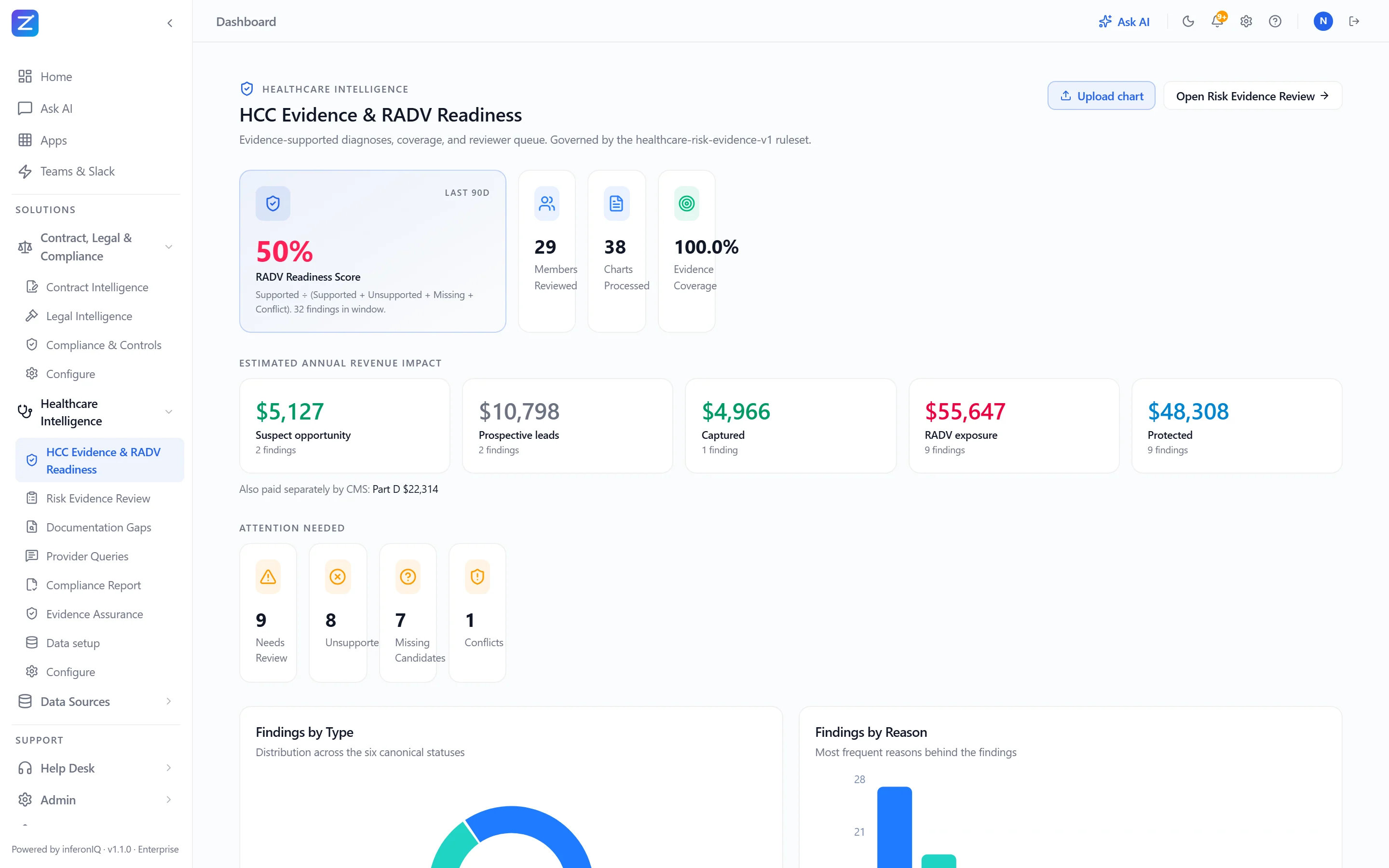
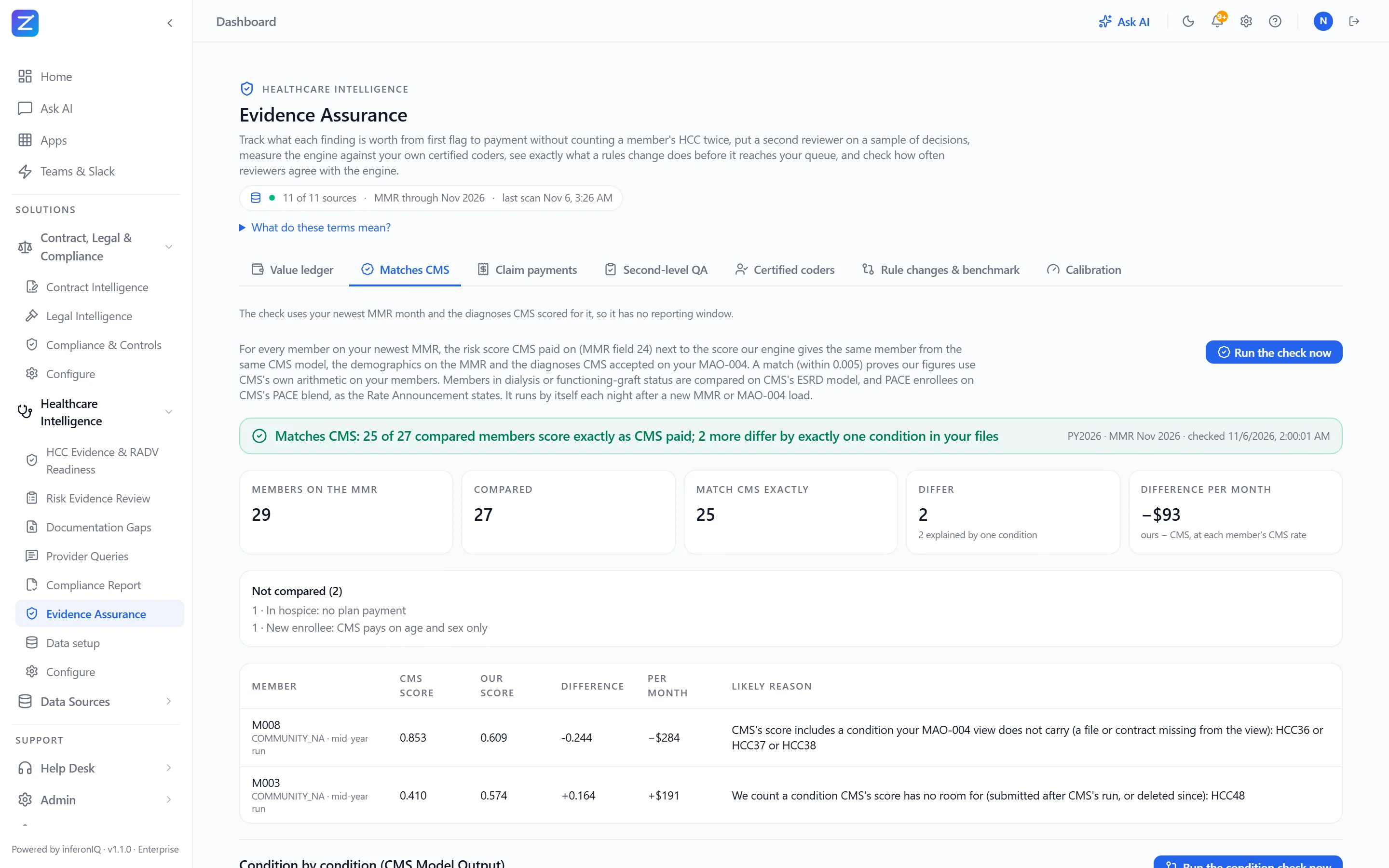
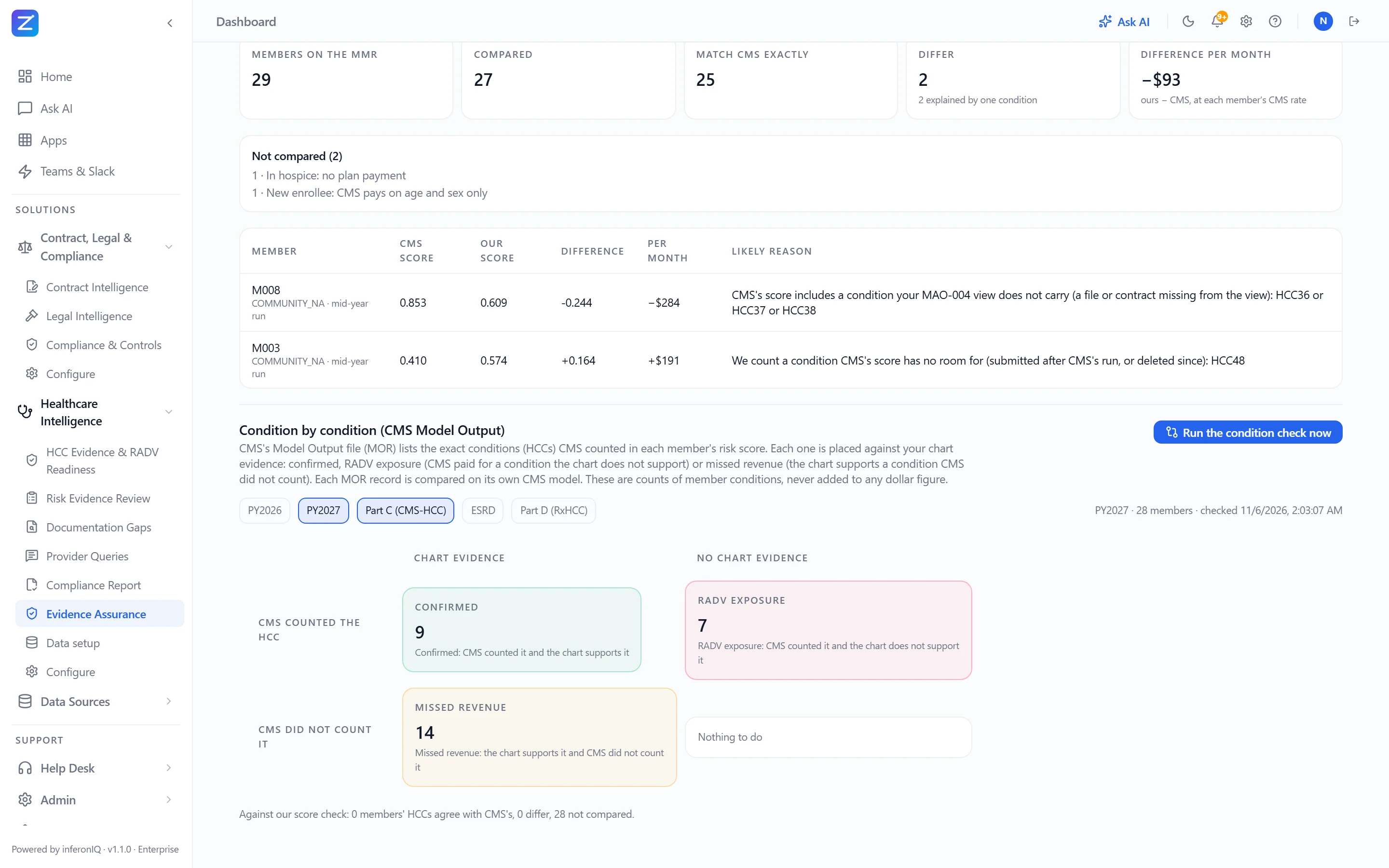
Captured from the live product on synthetic members and charts. No real patient data (PHI) is shown.
HCC Validation
Check every diagnosis on every claim against the doctor’s note, map ICD-10 to the CMS-HCC model for the payment year, apply CMS hierarchies and put a RAF and dollar value on every finding.
- ICD-10 → CMS-HCC V28 by payment year, hierarchies applied
- RAF and $ impact per finding, at each member’s own CMS rate
- Supported, unsupported, historical, conflicting or needs review, with page and quote
MEAT Evidence
Look for proof the provider monitored, evaluated, assessed or treated the condition — not just that it was listed. A problem-list or history-only mention is not accepted as support.
- Assessment & plan, labs, medications and imaging cited
- Quoted text with document and page
- Current-year date-of-service checks
Chart Review & Correction
Open any chart and see the source page beside everything the AI read from it: patient, date of service, rendering provider, signature, credential, record type and every diagnosis, each linked to its finding. A coder corrects how the chart was read; the chart itself is never edited.
- Charts worklist: read, tied to a member and claim, or “Not matched” with the reason
- A correction re-matches the chart at once and closes findings it no longer supports
- Identity is still checked, so a chart cannot be forced onto the wrong patient
Suspect Conditions
Surface diagnoses the chart documents — or pharmacy fills and lab results imply — that no claim carries, value each one in RAF and dollars, and send it to a coder, a chart chase or a provider query. Nothing is auto-coded.
- Documented but not submitted, or at the wrong specificity
- Pharmacy and lab signals with no claim (apixaban, eGFR, A1c)
- Opportunity valued net of V28 hierarchies
Recapture
Last year’s conditions that CMS paid on, or a coder accepted, that no qualifying visit has documented yet this year, and members who have not been seen yet, each with the dollars at risk next year.
- From the diagnoses CMS accepted (MAO-004) or last year’s accepted findings
- Members with no qualifying visit within your rule
- In the same retrieval worklist, exported the same way
Documentation Gaps
Turn unsupported and chart-less diagnoses — and conditions only pharmacy or lab data shows — into a ranked list of charts to fetch, exported to your retrieval team or vendor, and track every request until the returned chart has been read and reviewed.
- One request per chart, ranked by HCC and RADV risk, dollar value shown
- CSV export and status re-import for retrieval vendors such as Cotiviti or Reveleer
- Returned charts matched and read automatically
Provider Queries
Where the note falls short, or pharmacy and lab data point to a condition nobody documented, send the treating provider a neutral question and track it to an answer. Providers never see dollars or HCC codes.
- Clinical indicators and a question that asks for clinical judgment
- Options always include another diagnosis, not present and unable to determine
- Closes on its own once a reviewed chart documents the condition
RADV Readiness & Compliance Report
Know which risk dollars would survive a RADV audit. Trace every finding back to member, encounter, document, page and evidence, and hand auditors a PDF Compliance Report.
- Safe versus at-risk dollars across open findings
- An audit pack per finding: member → encounter → page, with the reviewer’s decision
- PDF Compliance Report for auditors
Dollars the Way CMS Calculates Them
Every finding is valued on the payment year’s CMS-HCC model, with normalization and the MA coding adjustment, at each member’s own CMS rate from your Monthly Membership Report (MMR). Part D, ESRD and PACE are worked out separately.
- Each member’s rate and segment from the MMR; your base rate only where the MMR does not cover a member
- Part D (RxHCC) and ESRD each have their own figure, never added into Part C
- PACE enrollees on CMS’s PACE blend for the year
Matches CMS & Model Output
Every night, recompute each member’s risk score from your MMR and MAO-004 and check it against the score CMS paid. Then compare condition by condition with CMS’s Model Output (MOR) file.
- Each difference explained, with CMS’s later corrections applied
- MOR: confirmed, RADV exposure or missed revenue for every condition CMS counted
- CMS files uploaded or picked up from your SFTP, network drive, SharePoint, OneDrive, Google Drive or S3
Evidence Assurance
Prove the program itself is right: the record is checked, a second reviewer samples decisions, your own certified coders measure accuracy, a rules change is previewed before it reaches the queue, and every dollar is tracked from found to paid.
- Signature, credential and record-type checks, citing CMS guidance
- Second-level QA, and accuracy measured by your own certified coders
- Value ledger, each member / HCC / year counted once; optional auto-accept calibrated to how often coders agree
Reviewer Guidance & History
Every finding explains itself: what Agree and Disagree mean, how to review it, the RAF calculation step by step, and a history of what changed it and why.
- “How to review this finding”, written for the coder
- Step-by-step RAF and estimated dollar calculation
- Change history with the cause: rules, CMS / ICD release, base rate, segment or a new chart
Sign-off, Escalation & Export
Every finding has an owner. Review levels follow your identity-provider groups, for example Chart Reviewer, Chart Approval Manager and Medical Director, each with a target turnaround. Reviewers agree, disagree or escalate to the next level or a named person, and agreed findings leave through your own export profiles.
- Named owners and a personal work queue, with people and groups synced from your IdP
- In-app and email notifications that carry no PHI
- Outside coding vendors, under a BAA, see only the findings assigned to them
Claim Payments
An N-way match on each claim line: claim ↔ its contract (fee schedule, percent of Medicare for doctor, lab and drug prices, and hospital stays by MS-DRG, per diem or stop-loss) ↔ Medicare’s price lists ↔ CMS’s NCCI edits. Out-of-network lines are checked at Medicare rates. Every line shows its formula and contract clause.
- Paid below or above the agreement, with the clause and page to cite
- Medicare price lists: Physician Fee Schedule, Clinical Lab, drugs at ASP + N%, MS-DRG
- NCCI code pairs and unit limits; lines that cannot be priced exactly are shown as not priced, with the reason
Contract & Legal Intelligence
Payer and provider agreements read automatically: rates, covered doctors and plans, obligations, renewal deadlines and BAAs. RADV audit notices, disputes and arbitration documents are summarized with their deadlines.
- The rates claim payments are checked against, read from the agreement
- Renewal and notice deadlines tracked
- Audit, dispute and arbitration documents summarized
Healthcare Ask AI & Agent Studio
Ask questions across claims, encounters, labs, medications, claim payments and clinical documents in plain English, set nightly alerts, and build your own apps without developers.
- Claims + chart in one question
- Governed, PHI-aware answers, every number traced to its source
- Nightly alerts and Agent Studio apps
From evidence to action
Same NL2SQL, Document AI, workflow and audit engine as Enterprise Intelligence.
- 1ConnectClaims · 835 remittances · ACO CCLF files · Encounters · Labs · Medications · Clinical PDFs · CMS MMR, MAO-004 & MOR · Agreements
- 2UnderstandDocument AI · Clinical concepts · ICD-10 · Member timeline
- 3ReconcileClaims ↔ Encounter ↔ Clinical evidence ↔ What CMS paid
- 4EvaluateHCC rules · MEAT · Current-year evidence · Agreement & Medicare rates · NCCI
- 5FindingsClassified, evidence-linked, ranked by impact, each with an ownerSupportedUnsupportedMissing candidateHistoricalConflictNeeds review
- 6ActChart review & correction → Sign-off or escalation → Record request → Provider query → Export & audit evidence
Two agents. One cross-check.
The Invoice Agent reads what you're being charged. The Contract Agent knows what you agreed to. Together, they surface money you'd never find manually.
Freight Leakage
Missed Rebate Dollars
Supplier SLA Breach
Expired Agreement Spend
From receipt to ERP posting. People only where they matter.
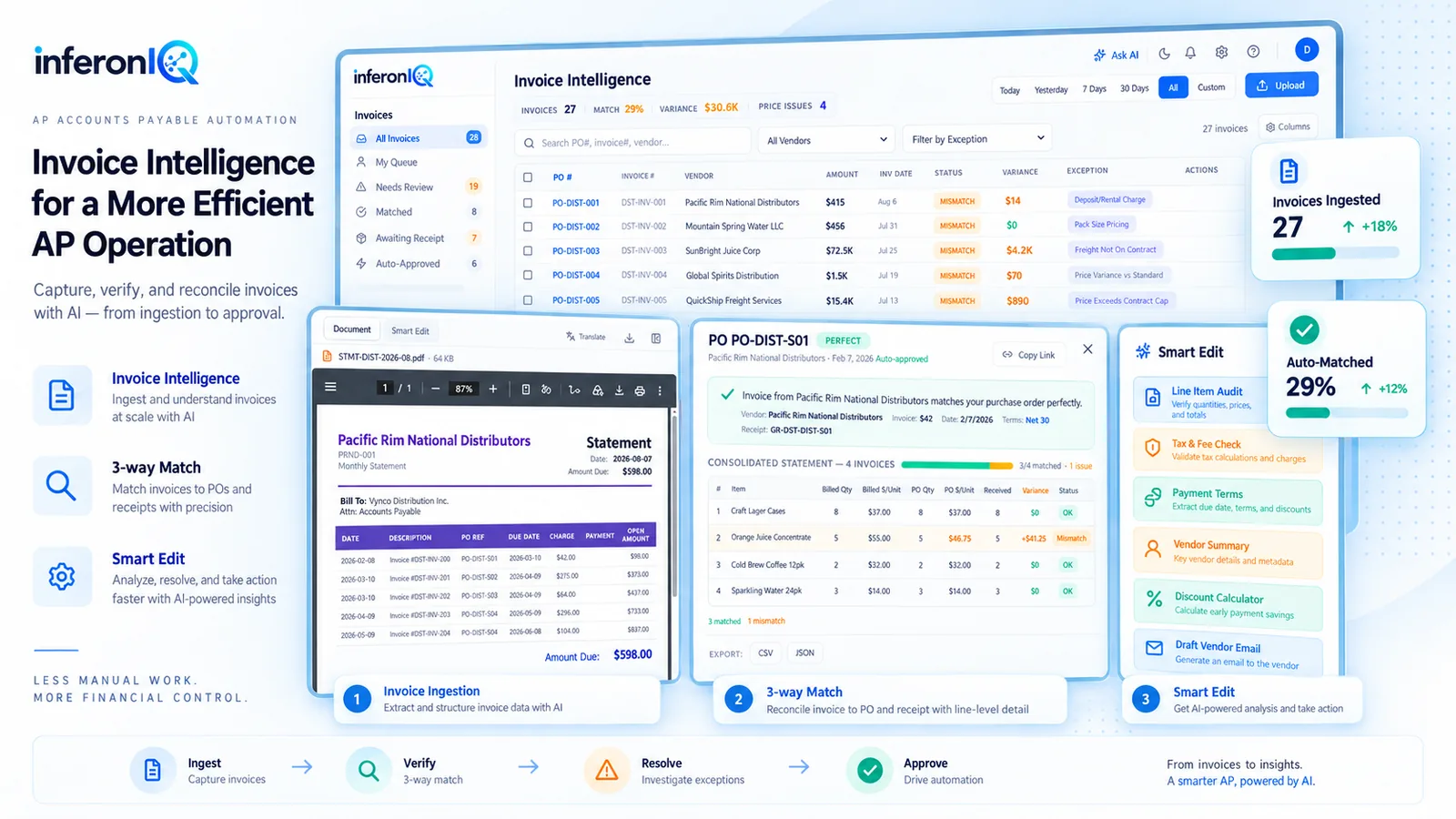
AI handles extraction, matching, routing, vendor disputes and ERP export. Your team sees only the exceptions: they correct a misread field on one screen, the invoice re-matches, and the right level approves or escalates it.
Straight-through processing tracks % of invoices with zero human touch. Self-learning rules adapt per vendor automatically.
Never miss a renewal or escalation clause.
AI extracts every auto-renewal date, price escalation, liability cap, and obligation from your contract portfolio. Risk-scored and monitored 24/7 with proactive alerts.
Multi-Agent Architecture
Invoice Agent catches overcharges. Contract Agent knows what you agreed to.
Healthcare Agent backs every HCC with evidence. Query Agent answers anything you ask.
Together, they find money no single tool can. Describe any workflow in English — get a live operational app in minutes.
Describe a workflow. Get a live app. In plain English.
Not just dashboards — operational workflows with approvals, routing, alerts, and SLAs. Describe what you need in natural language. InferonIQ builds, connects, and deploys a working app in minutes. No code. No tickets.
Example prompt:
“Build an invoice exception review app where AP analysts approve or reject mismatches above $5,000. Auto-route rejected invoices to procurement and send Slack alerts.”
Ask in plain English.
Get instant answers.
From question to answer in seconds — across databases, documents, invoices, and contracts. No semantic models to build. No SQL to write. InferonIQ reasons across both structured and unstructured enterprise data.
Ask in plain English. Get instant answers.
“Which vendors overcharged us this quarter?” — InferonIQ reasons across structured databases and unstructured documents alike. Invoices, contracts, emails — all queryable in plain English with full lineage.
Invoice INV-2026-0142 from Meridian Supply Co. (3 line items, $18,500) matched against PO-4417. Line items: 1 matched, 1 not found, 1 freight/service. Total leakage: $7,650.00. Requires review before payment approval.
| Description | Qty | Unit | Invoiced | Expected | Status |
|---|---|---|---|---|---|
| Assembly Component, Grade A | 400 | $27.63 | $11,050.00 | $10,400.00 | MATCHED |
| Packaging Unit (case of 20) | 300 | $22.00 | $6,600.00 | — | NOT FOUND |
| Freight / Delivery | 1 | $850.00 | $850.00 | — | FREIGHT/SERVICE |
Zero semantic modeling. Instant understanding.
Connect a database and InferonIQ automatically catalogs every table, profiles columns, infers foreign keys, and generates AI descriptions — in under 45 seconds for 50 tables. No dbt. No semantic layer. No manual mapping.
Gets smarter with every interaction.
Every query, correction, and match decision feeds back into your isolated AI model. 8 self-improving mechanisms work continuously — no other customer sees your data or benefits from your patterns. Your instance is yours alone.
Repeat queries return in 50ms
Same mistake never repeated
Understands your business language
Good patterns rise, weak ones fall
Adapts to your risk tolerance
Vendor SKU → ERP SKU mapping
Auto-catalogs + AI descriptions
Admin-curated governance override
All mechanisms are securely isolated by customer_id. No cross-tenant data leakage. Your AI model is yours alone.
Cross-platform. Production-ready.
One question across Snowflake + Oracle + SQL Server. Each source runs its own dialect-native SQL in parallel, joins are measured against the data before they are trusted, and a self-healing pipeline recovers from errors without human intervention.
Thousands of tables in. A handful reach the model.
Generating SQL is the easy part. The hard part is knowing what your data means. InferonIQ builds a semantic map of your estate (meaning, measured relationships, your vocabulary) and uses it to send each question to the few tables and documents that can answer it.
- 01 · Your data estate10,000 tables
Warehouses, ERPs and document stores, with cryptic names, thin documentation and missing keys.
- 02 · Semantic catalogBuilt once
Each source is profiled within fixed bounds, described from its own samples, related by measured overlap and indexed by business meaning.
- 03 · Routing~100 ms
The question is matched to the catalog by meaning, not by table name.
- 04 · Working set≤ 20 tables
The model sees only the relevant tables, the most relevant columns of each, trusted joins and your glossary.
- 05 · ExecutionIn place
Dialect-native SQL runs inside each source. Only filtered or aggregated results come back.
- 06 · AnswerReconciled
Results from different systems are joined on measured keys, with the SQL and sources shown.
Dynamic
No semantic model to build before the first question.
- AI drafts table and column descriptions, synonyms and joins from the schema and real samples
- Your edits are never overwritten and change what the engine finds straight away
- Re-profiling only touches tables that changed; documented columns skip the model
- Exceptions are yours to tune: switch any check off, change its severity, or add your own rules
Scalable
Cost and prompt size stay flat as the estate grows.
- Tables above a million rows are profiled from a bounded sample, not a full scan
- Descriptions are written in batches of about 15 tables per model call
- Every question works from at most 20 tables across all sources, however many you connect
- Filters and aggregations run inside your warehouse; no bulk copies, no ETL
Built for messy data
Measures what it infers instead of trusting names.
- Inferred joins are checked against the data (value overlap and key uniqueness) before they are trusted
- Cryptic names are found by meaning: WRK_REQ answers a question about repair tickets
- Questions span databases and documents: contract clauses and obligations are joined with ERP rows
- If a source hits a row limit, the answer says the result may be incomplete instead of guessing
Fast
Measured on our routing benchmark and live connections.
- Median routing time ~105 ms; right tables picked on 70 of 70 benchmark questions and 16 of 16 held-out ones
- One question embedding is reused across routing, retrieval and memory
- Stable schema context is prompt-cached; repeat questions come from query memory
- SQL is generated natively for each source’s dialect: SQL Server, Oracle, MySQL, PostgreSQL, Snowflake, BigQuery and more
Everything the engine gives you.
Proactive Next Best Actions
Every answer suggests specific actions: Approve, Monitor, Investigate, Automate, Prevent, Escalate. Context-aware reasoning across Ask → Understand → Detect → Recommend → Act → Automate.
Live NL2SQL on YOUR Data
Query your actual databases in plain English. "Show top 10 vendors by spend this quarter" → accurate answer in 1.5-3 seconds.
Agent Studio — No-Code Apps
Describe a workflow in plain English. Get a live operational app with approvals, routing, SLA timers, and alerts. Not a dashboard — a working system.
Federated Cross-System Intelligence
One question across Oracle + SQL Server + Snowflake. No bulk replication: each source filters and aggregates in place, then results are joined on measured keys.
BYOC / On-Prem Deployment
Sealed container inside your VPC. Your data never leaves. Only AI requests exit — the question, the relevant schema and the result being summarised — to the provider you approve.
Connects to anything
Native connectors for Oracle, SQL Server, Snowflake, BigQuery, Databricks, Redshift, PostgreSQL, MySQL, SharePoint, S3, SFTP, Google Drive and email; Coupa, DocuSign and Ironclad; Epic, Oracle Health, FHIR R4 and HL7 v2. SAP and NetSuite through their database or REST API.
On-Prem Connectivity Agent
Using SaaS with databases behind your firewall? Install a lightweight connectivity agent on a Windows or Linux server in your network. It runs as a service, and its health and version are managed from the dashboard.
SSO, SCIM & Roles
SAML or OIDC single sign-on, SCIM-provisioned groups, and roles and review teams that decide who sees, corrects and approves what.
Scheduled Jobs
Nightly matching, inbox polling, anomaly sweeps, contract analysis and spend refreshes run on your schedule, with notifications when something fails.
Observability
System health, pipeline status, query logs, answer confidence and AI cost in one place, so you can see what the platform did and what it cost.
Gain-Share Pricing
We earn a share of recovered cash. Find nothing? Pay nothing. No per-page fees. Self-funding from your own waste.
Approve & Export to Your ERP
Approved invoices and agreed findings leave through export profiles you configure: CSV, JSON, XML, Excel, text or FHIR, by SFTP, API, S3, Azure Blob, email or network drive. Zero re-keying.
Human Review & Correction
One review screen for invoices and clinical charts: the source beside every field read, with its checks. Correct a misread value and it re-matches at once; the source is never edited and every correction is audited.
Owners, Review Levels & Escalation
Every exception and finding has an owner. Review levels map to your identity-provider groups (AP Manager, Finance Director, Medical Director), with escalation to the next level or a named person.
Model-Agnostic AI
Choose which AI vendors may process your data, with no failover to any other. Before any model change we qualify the new model on test suites and re-ask each tenant’s confirmed questions to catch regressions. BYOC runs on your own AI account.
Teams, Slack & MCP
Ask from Microsoft Teams, Slack or any MCP client through a governed MCP server, with scoped, expiring API keys and the same permissions as the app.
What inferonIQ replaces.
The line items this platform removes from your budget — and how long each one used to take.
| Traditional Approach | Cost | Time | inferonIQ |
|---|---|---|---|
| Data catalog project (Alation, Collibra) | $300K–$1M/yr | 6–12 months | Automatic — 45 seconds |
| Schema documentation sprint | $50K–$150K | 2–4 months | AI-inferred at connection time |
| Custom BI dashboards per question | $5K–$20K each | 1–4 weeks | Natural language — instant |
| Data analyst headcount (per question) | $120K–$180K/yr | Days per ticket | Self-service — seconds |
| ETL for cross-system reporting | $200K–$500K | 3–6 months | Federated query — zero ETL |
Your data never leaves your cloud.
BYOC deploys as a sealed container inside your infrastructure. Read-only connections, a full audit trail and enterprise governance from day one.
Messy data, large estates: common questions
What data and architecture teams ask before connecting a source
Our metadata is poor: cryptic table names, few comments, no foreign keys. Will it still work?
We have thousands of tables. Do you send the whole schema to the AI?
How do you find joins when our database has no declared keys?
Do you copy our databases?
How do questions across several databases work?
What does onboarding a large estate cost in AI calls?
Can our team correct what the AI inferred?
Can we configure which exceptions are flagged?
Have more questions? Contact us